


-
 Digital Download Delivery
-
 Time Delivery
-
 Free updates
-
Unlimited version
-
Support 24/7
-
Best price
Introduction about USDCAD Scalper
USDCAD Scalper EA MT4 is a light Expert Advisor for 1-minute (M1) USD/CAD scalping. It implements high-frequency, low-risk tactics under predefined trading hours and applies strict spread control for accurate entry and stable performance.
Technical Specifications
| Feature | Details |
|---|---|
| Trading Platform | MetaTrader 4 (MT4) |
| Time Frame | M1 (1-minute chart) |
| Minimum / Recommended Deposit | $500 (or at least $20 with a Cent account) |
| Supported Currency Pair | USDCAD |
| Setup Files | Included on purchase |
| Recommended Brokers | Exness Broker, HTFX Broker |
| Recommended VPS | MyfxVPS.com (Blue VPS, Golden VPS) |
| Product Type | NoDLL |
Key Futures of USDCAD Scalper
- Low-Liquidity Trading Sessions: Trading during non-peak hours to avoid volatility and slippage.
- Spread Protection: Orders are executed only when the spread is within a safe area, reducing fees.
- No High-Risk Strategies: Avoids strategies like Martingale, Grid, and Hedging.
- Smart Trade Closure: Uses internal logic for closing instead of fixed SL/TP, adapting to the market.
Installation and Usage Guide
Package Content:
Experts: USDCAD Scalper EA MT4_1441+.ex4
Presets: USDCAD M1.set
To start using USDCAD Scalper MT4 , follow these steps:
Step 1: Purchase and Download
- Visit the Algofxbot.com website.
- Navigate to the USDCAD Scalper MT4 product page.
- Click the “Buy Now” or “Add to Cart” button.
- Complete the checkout process, providing the necessary information and payment details.
- Upon successful payment, you will receive a download link for the USDCAD Scalper MT4 file
Step 2: Install Meta Trader 4 (MT4)
- If you don’t already have MT4 installed, download it from your Forex broker’s website or directly from the Meta Quotes website.
- Install MT4 on your computer, following the on-screen instructions.
Why You Should Buy from Algofxbot
When purchasing USDCAD Scalper MT4 from Algofxbot, you will benefit from:
- Professional Customer Support: The support team is always ready to assist you in setting up and using the product.
- Competitive Pricing: Algofxbot offers competitive pricing compared to the market.
- Regular Updates: Our lifetime free updates ensure that you always have access to the latest version and features.
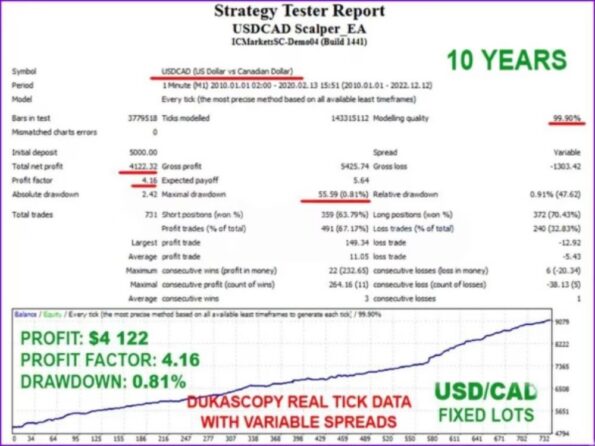
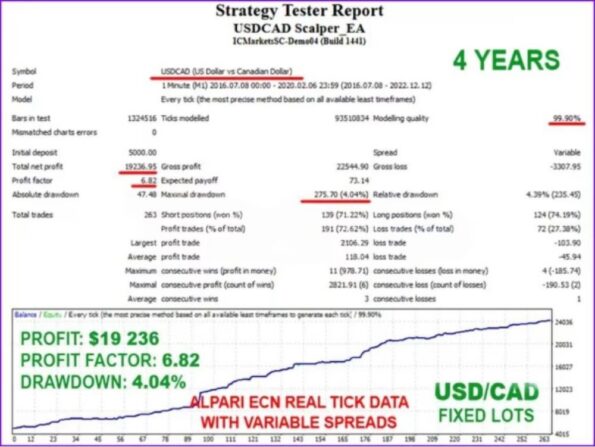
- Proven Track Record: USDCAD Scalper MT4 comes with extensive back testing data, demonstrating its consistent performance across various market conditions. Our results are transparent and verifiable.
- Ethical and Transparent Practices: We believe in honesty and transparency. We don’t make unrealistic claims or promises. We provide realistic expectations and encourage responsible trading.
- Secure and Reliable: Your account security is vital. USDCAD Scalper MT4’s code is encrypted and it is highly secure
If you are looking for a reliable and efficient automated trading tool, USDCAD Scalper MT4 is the perfect choice. Explore this product further and start your successful trading journey today.
To learn more about Forex Robots, Forex EAs, and other trading tools, visit Algofxbot’s website. We provide a range of automated trading solutions to help you optimize your trading strategy.



Reviews
Clear filtersThere are no reviews yet.