

Blog
MT4 vs TradingView: Which Platform Is Better for Forex Charting and Execution?

Deciding between MetaTrader 4 (MT4) and TradingView depends entirely on your priorities as a trader. For traders who prioritize automated trading with Expert Advisors and need near-universal broker access, MetaTrader 4 is the better platform, while TradingView is superior for manual traders who demand advanced charting tools, social features, and a modern user interface. Each platform serves a different core purpose, making the “better” choice a matter of personal trading style and technical requirements rather than a simple declaration of one being superior in all aspects.
For pure charting and technical analysis, TradingView is unequivocally the better platform, offering a vastly more powerful, flexible, and user-friendly charting package. Its web-based interface is clean and intuitive, its drawing tools are extensive, and its library of community-created indicators is unparalleled. This makes it the preferred choice for traders who spend the majority of their time analyzing price action and planning trades manually.
When it comes to direct trade execution and broker availability, MetaTrader 4 remains the industry standard, providing near-universal integration with Forex brokers for seamless execution. Almost every retail forex broker in the world offers MT4 as their primary or secondary platform. This means you can analyze and execute trades within a single, reliable application without worrying about whether your broker is supported.
Ultimately, your choice will be guided by what you value most. Do you need a robust, all-in-one system for automated strategies provided free by your broker? Or do you prefer a sleek, powerful analysis tool that you can access from anywhere, even if it means placing trades on a separate platform? This guide will break down the key differences to help you make the most informed decision for your trading journey.
Which Platform Is Better Overall: MT4 or TradingView?
The better platform depends on your trading style: MT4 is superior for automated trading and broker availability, while TradingView excels in charting, analysis, and user experience for manual traders. This distinction is the most important factor when choosing between them. Neither platform is universally “better,” but each is the clear winner for specific types of traders.
To understand this better, let’s look at the ideal user for each platform and compare their core features side-by-side. Your decision should align with the profile that most closely matches your trading needs, workflow, and technical preferences. For many, the choice comes down to a trade-off between the industry-standard execution of MT4 and the modern analytical power of TradingView.
| Feature | MetaTrader 4 (MT4) | TradingView | Winner |
|---|---|---|---|
| Primary Use | All-in-one analysis and execution | Advanced analysis, charting, social | Draw (Depends on need) |
| Charting & Tools | Functional but dated | Modern, extensive, superior | TradingView |
| Automated Trading | Industry standard (Expert Advisors) | Limited (Pine Script strategies) | MT4 |
| Broker Integration | Near-universal (99% of Forex brokers) | Limited and growing | MT4 |
| User Interface | Outdated, desktop-focused | Modern, intuitive, web-based | TradingView |
| Accessibility | Windows, macOS, Mobile | Any device with a web browser, Mobile | TradingView |
| Cost | Free (provided by broker) | Freemium model (paid subscriptions) | MT4 |
| Community | Large, but fragmented forums | Integrated social network | TradingView |
| Asset Classes | Primarily Forex & CFDs | Forex, Stocks, Crypto, Futures | TradingView |
Who Should Choose MetaTrader 4 (MT4)?
You should choose MetaTrader 4 if you are a trader who relies heavily on automated trading strategies, known as Expert Advisors (EAs). MT4 was built from the ground up to support algorithmic trading through its proprietary MQL4 programming language. The platform has a massive, decades-old ecosystem of both free and paid EAs available on the MQL5 Marketplace and across thousands of independent websites. If your goal is to backtest, optimize, and deploy trading robots, MT4 is purpose-built for this and remains the undisputed leader.

Additionally, MT4 is the right choice if simplicity and universal broker access are your top priorities. Because it is the industry standard, you will almost never have to worry about whether a Forex broker supports it. You can open an account with virtually any broker and know that you can use the MT4 platform. It’s a reliable, stable, and straightforward terminal that combines charting and execution in one piece of software. It’s also completely free, as the licensing costs are paid by your broker. For traders who want a no-frills, dependable workhorse that gets the job done without extra features or costs, MT4 is an excellent and logical choice. It’s the platform you learn once and can use with almost any broker for your entire trading career.
Who Should Choose TradingView?
You should choose TradingView if you are a manual or discretionary trader who demands top-tier charting and analysis tools. TradingView’s charting package is in a league of its own. It offers an incredibly intuitive, smooth, and highly customizable experience with a vast array of drawing tools, technical indicators, and chart types. The platform is web-based, meaning you can access your charts, layouts, and analysis from any computer or mobile device without installing any software. If your trading process involves deep technical analysis, marking up charts extensively, and exploring unique indicators, TradingView provides a far superior toolkit.

TradingView is also the ideal choice for traders who value community, collaboration, and multi-asset analysis. The platform has a built-in social network where you can share trade ideas, publish your analysis, and learn from millions of other traders. Its Pine Script language allows users to create and share custom indicators easily, resulting in a public library with over 100,000 community-built scripts. Furthermore, if you trade more than just Forex and CFDs, such as stocks, cryptocurrencies, or futures, TradingView consolidates data for all these markets into one place. For the modern analyst who wants the best tools and a collaborative environment, TradingView is the clear winner.
How Do MT4 and TradingView Compare on Charting and Analysis Tools?
TradingView offers a vastly superior charting and analysis experience with more tools, better customization, and a modern interface, while MT4 provides a functional but dated package that covers the basics. When you place the charting packages side-by-side, the difference is immediately apparent. TradingView was designed as a charting-first platform, and its excellence in this area is its main selling point. MT4, on the other hand, was built as an all-in-one execution terminal where charting is a necessary feature rather than the main event.
Let’s explore the specifics of what each platform offers. While MT4 can get the job done for basic technical analysis, TradingView empowers traders with a level of depth, flexibility, and usability that is simply unmatched by the older platform. For anyone whose trading edge relies on in-depth chart work, this difference can be a deciding factor.
What Charting Capabilities Does TradingView Offer?
TradingView’s charting capabilities are its greatest strength, setting the benchmark for modern financial analysis platforms. The entire experience is designed to be fluid, powerful, and intuitive. First and foremost, the charts themselves are rendered using HTML5, which makes them fast, interactive, and beautiful to look at. You can smoothly zoom and scroll through historical data with your mouse wheel, a simple feature that feels clunky on MT4.

The platform provides an enormous library of analytical tools. Specifically, you have access to:
- Over 100 built-in technical indicators and more than 100,000 community-built indicators. The public library is a goldmine of strategies and custom tools created by other traders using Pine Script.
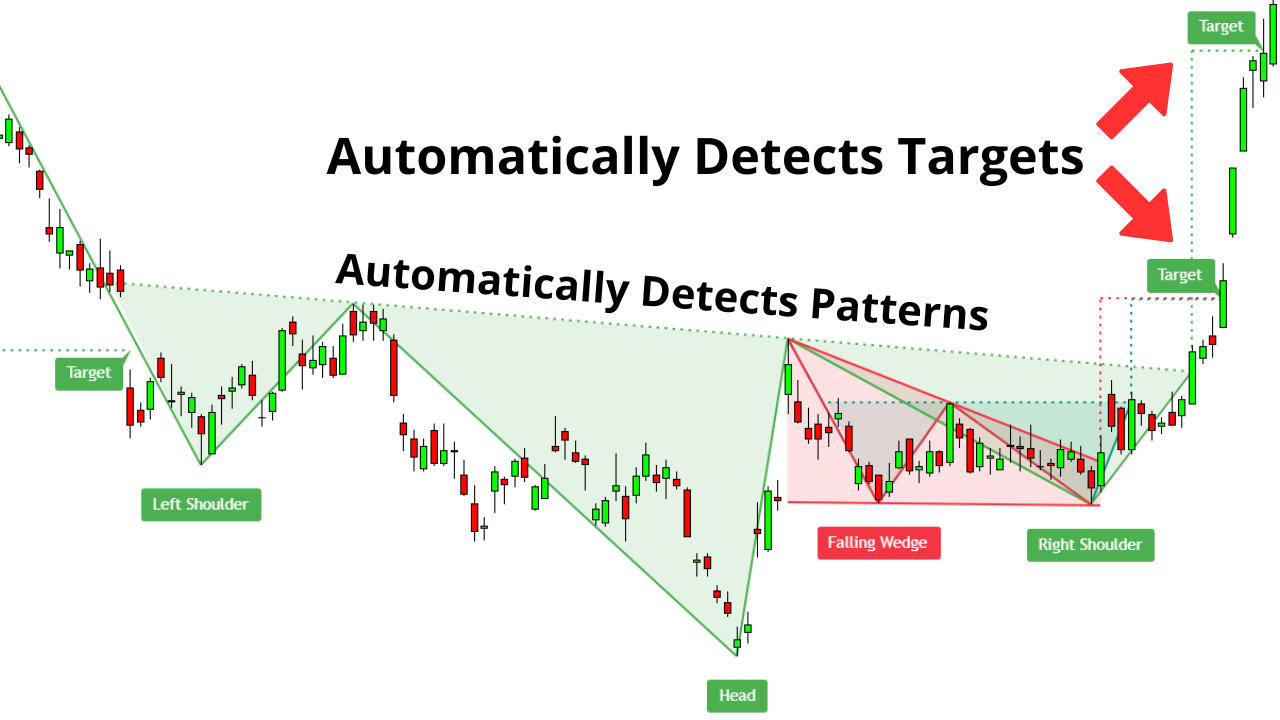
- More than 50 advanced drawing tools, including Gann boxes, Fibonacci retracements, Elliott Wave patterns, and extensive annotation tools. Applying and adjusting these on the chart is a simple drag-and-drop process.
- Multiple chart layouts. On paid plans, you can view up to 8 charts in a single window, each with its own symbol, timeframe, and indicators. This is a massive advantage for traders monitoring multiple markets or timeframes simultaneously.
- Server-side alerts. You can set highly specific alerts (e.g., “alert me when the RSI crosses above 70 on the EUR/USD 4-hour chart”) that will trigger via push notification, email, or webhook, even if your browser is closed. This is far more robust than MT4’s client-side alerts.
What Are the Limitations of MT4’s Charting?
While MT4’s charting is perfectly functional for standard technical analysis, its limitations become clear when compared to a modern platform like TradingView. The interface is the most obvious drawback. It looks and feels like software from the early 2000s because it is. The charts are less responsive, zooming and navigation can be clunky, and the overall aesthetic is dated. Customizing the look and feel of your charts is possible but requires navigating through cumbersome property menus.

MT4 comes with a standard set of around 30 built-in technical indicators and a basic collection of drawing tools, including trendlines, channels, and Fibonacci levels. This is sufficient for many classic trading strategies, but it pales in comparison to the sheer volume and variety available on TradingView. To access more advanced or niche indicators, you must manually find, download, and install them into MT4’s program files. This process can be confusing for beginners and sometimes leads to platform instability if the custom code is not well-written. Furthermore, MT4 only allows you to view one chart at a time in a fully expanded window. While you can tile multiple charts, you cannot create the sophisticated, multi-chart layouts that TradingView offers. The platform simply was not designed for the kind of deep, multi-faceted visual analysis that is now common.
Which Platform Is Better for Trade Execution and Broker Integration?
MetaTrader 4 is the clear winner for trade execution and broker integration, as it is the industry standard offered by nearly every Forex broker for direct trading. Its primary function is to act as a direct link between you and your broker’s servers, making it an all-in-one solution for both analyzing the market and executing trades. TradingView, by contrast, started as a pure analysis platform and has only recently started integrating with brokers for direct trading.
Here’s the breakdown of how each platform handles placing and managing trades. This distinction is critical because it determines your workflow. With MT4, you work within a single environment. With TradingView, you might have to use two separate platforms, one for charting and another for execution, unless your specific broker is one of the few that have integrated directly.
How Does Trade Execution Work on MT4?
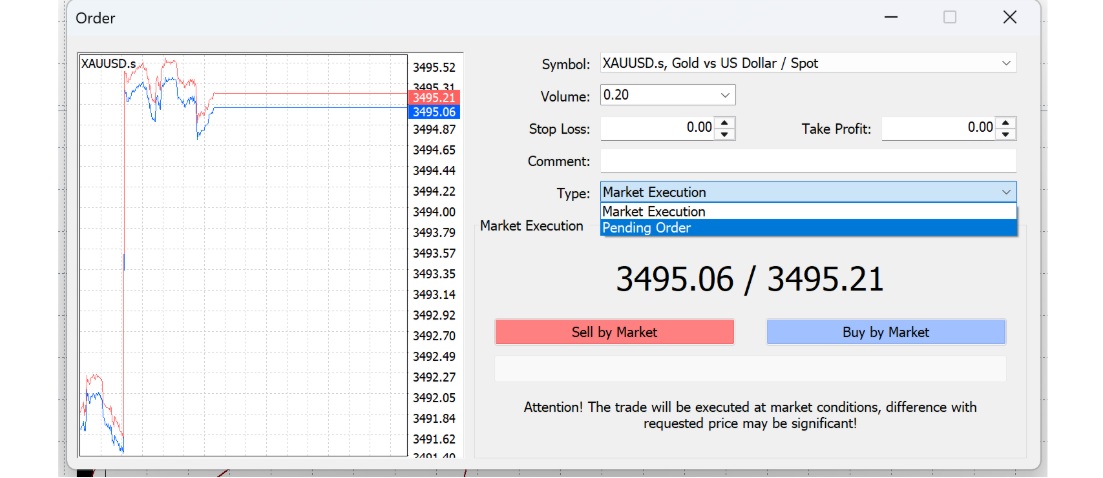
Trade execution on MetaTrader 4 is direct, seamless, and comprehensive. The platform is designed as a dedicated trading terminal that you download from your broker. Once you log in with your account credentials, you are connected directly to their trading servers. This allows for instant order placement and management from within the same interface you use for charting. You can open, modify, and close trades with just a few clicks.

MT4 supports a full range of order types, including:
- Market Orders: Execute a trade immediately at the current market price.
- Pending Orders: Set orders to be executed in the future when the price reaches a specific level. This includes Buy Limit, Sell Limit, Buy Stop, and Sell Stop orders.
- Stop Loss and Take Profit: Attach risk management levels to any order to automatically close a position at a predefined loss or profit.
The “Terminal” window at the bottom of the screen provides a complete overview of your account, including your balance, equity, margin, open positions, and account history. Because nearly every Forex and CFD broker offers MT4, it provides a consistent and reliable execution experience that you can take with you from broker to broker.
How Does Trade Execution Work on TradingView?
Trade execution on TradingView works differently because it is not universally connected to all brokers. It functions primarily as a third-party charting and analysis platform. To execute trades, you must connect it to a supported broker through its “Trading Panel” feature. TradingView has been expanding its list of integrated partners, which includes major names like Forex.com, OANDA, Pepperstone, and TradeStation. If your broker is on this list, you can log in to your brokerage account directly through TradingView and place trades from its charts, creating an experience similar to MT4.
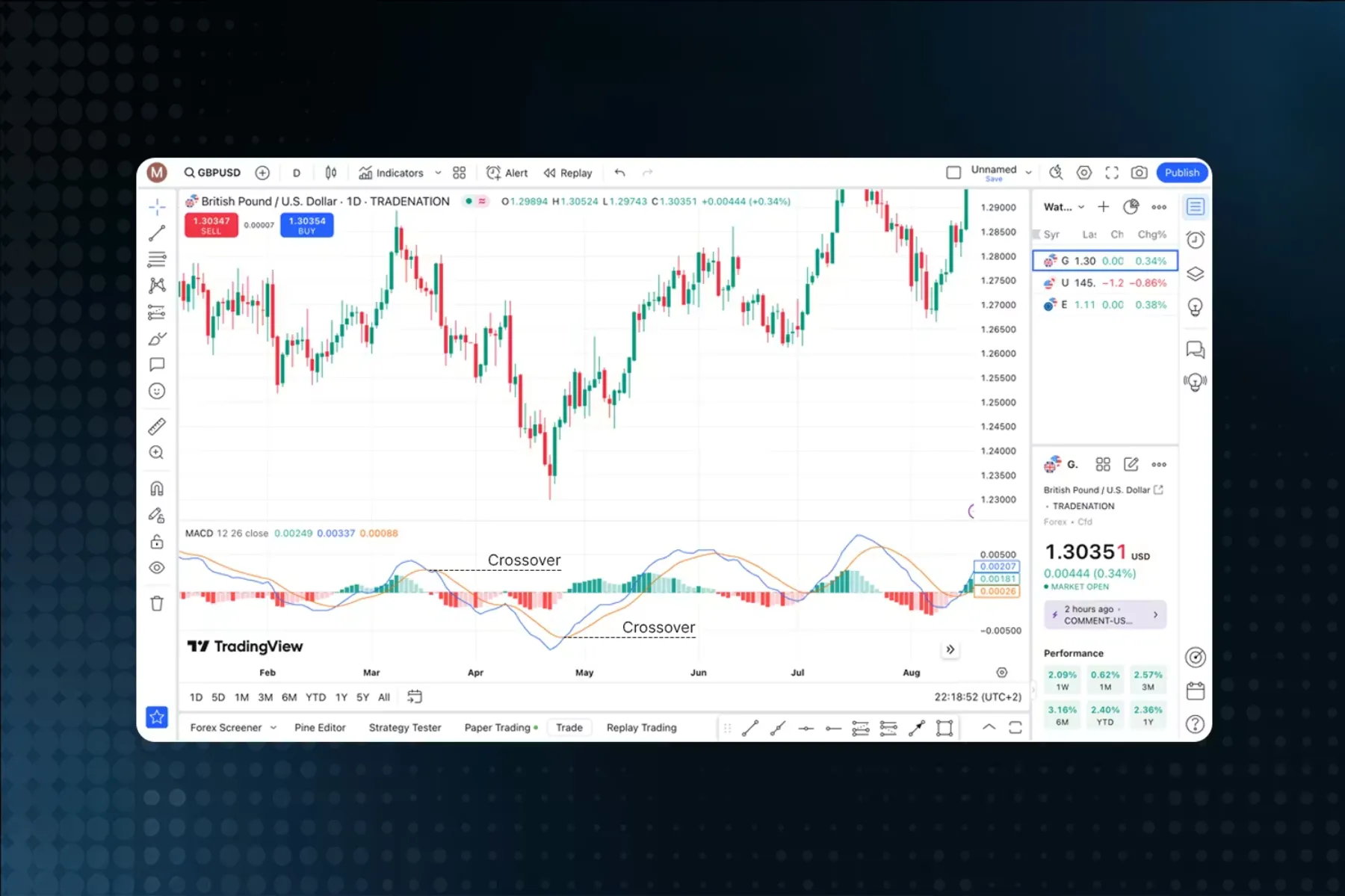
However, if your broker is not an integrated partner, which is true for the vast majority of brokers worldwide, you cannot execute trades on TradingView. In this common scenario, traders use TradingView for its superior charting and analysis capabilities and then switch over to their broker’s provided platform, often MT4 or a proprietary web trader, to actually place the trade. This creates a two-platform workflow: analyze on TradingView, execute on MT4. While this is a workable solution for many, it lacks the convenience and speed of an all-in-one system and introduces the potential for errors when switching between applications.
Is MT4 or TradingView Easier to Use for Beginners?
TradingView is significantly easier for beginners to use due to its modern, intuitive, web-based interface that feels familiar and requires less of a learning curve than MT4. For anyone who has used a modern web application, TradingView’s design, navigation, and functionality will feel natural from the moment they open it. The platform prioritizes user experience, making it simple to find tools, apply indicators, and customize charts.
To understand this better, let’s compare the initial user experience and learning process on both platforms. The contrast in design philosophy is stark. TradingView is built for accessibility and ease of use, while MT4 is a powerful but older piece of software that expects the user to adapt to its less-intuitive layout.
Why Is TradingView Considered More User-Friendly?
TradingView is considered more user-friendly for several key reasons, all stemming from its modern, web-first design. First, its accessibility is unmatched. As a browser-based platform, there is nothing to download or install. You can simply go to the website, sign up, and start analyzing charts immediately from any computer with an internet connection. Your layouts, drawings, and indicators are saved to your account in the cloud, so your workspace is consistent across all devices.
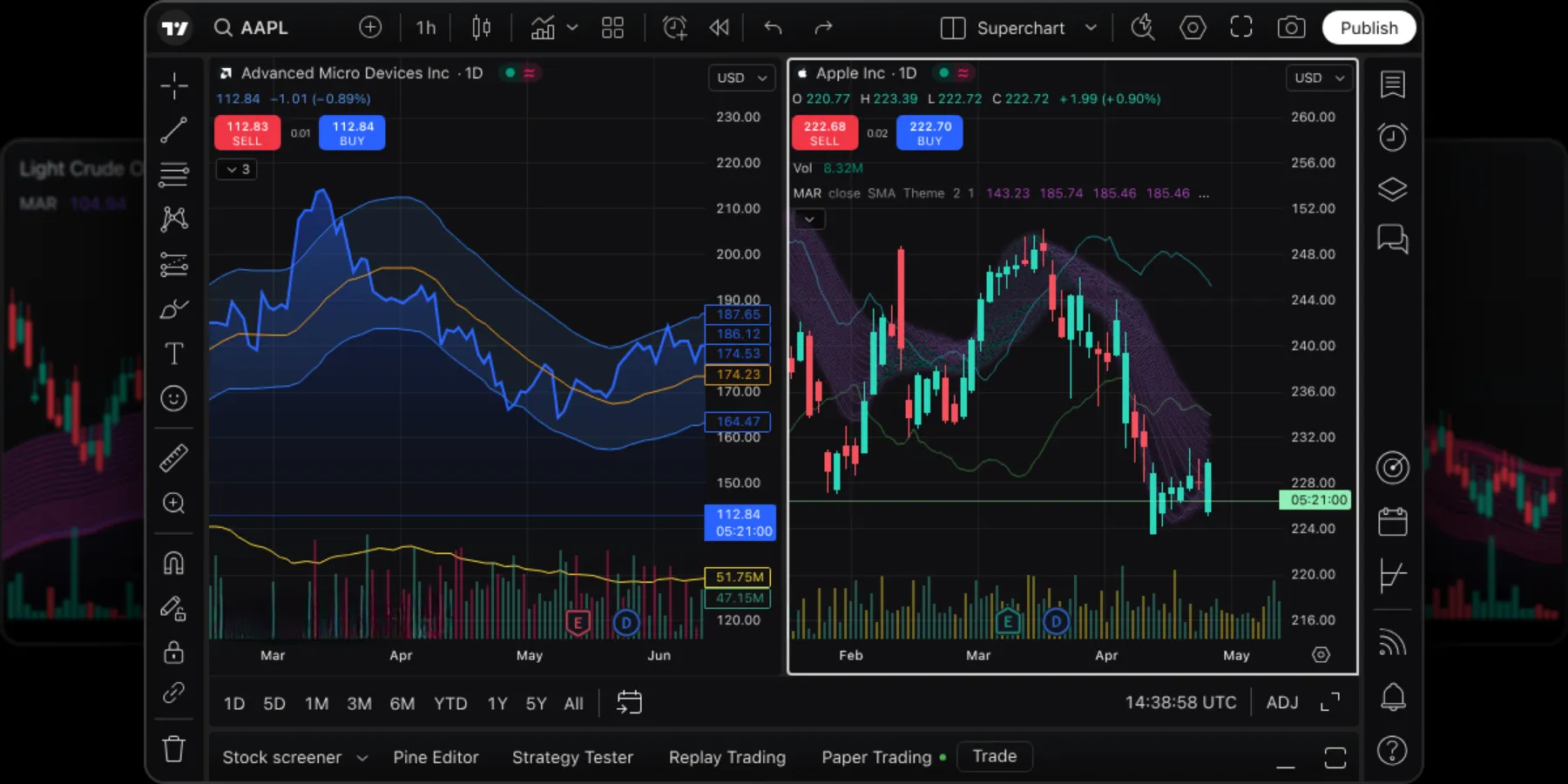
The user interface (UI) and user experience (UX) are clean, logical, and intuitive. Menus are clearly labeled, and tools are organized into easy-to-find toolbars. Adding an indicator or drawing a trendline is a simple point-and-click process. Chart navigation is incredibly smooth; zooming in and out with a mouse wheel or pinching on a trackpad feels responsive and natural. Furthermore, the integrated social features and public indicator library create a supportive environment where beginners can see how others analyze the market, copy ideas, and learn from a vast community without ever leaving the platform. This combination of modern design and accessibility dramatically flattens the learning curve for new traders.
What Is the Learning Curve for MT4?
The learning curve for MetaTrader 4 is noticeably steeper for a beginner. The platform’s interface is a product of its time, designed in the early 2000s, and it has not received a significant visual or usability overhaul since. For a new user, the layout can feel cluttered and intimidating. The screen is typically divided into several key windows, like “Market Watch,” “Navigator,” and “Terminal,” and understanding the purpose of each one takes time.
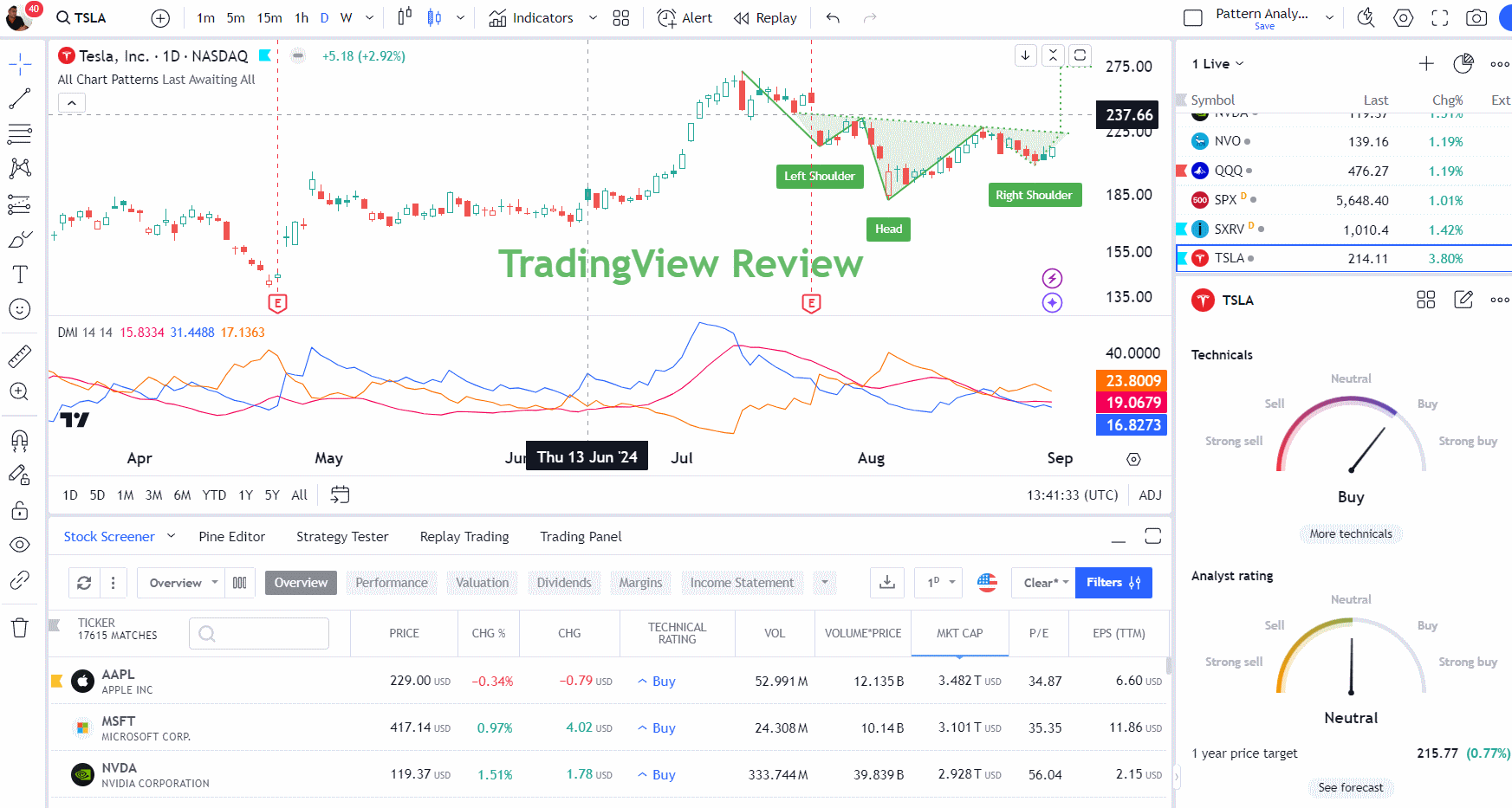
Simple tasks that are intuitive on TradingView can be more complex on MT4. For example, installing a custom indicator requires navigating to the platform’s file directory on your computer and manually copying the indicator file into the correct folder, then restarting the platform. Customizing chart colors and properties involves right-clicking and navigating through layered menus that can feel clunky. While the platform is extremely powerful once you learn its ins and outs, that initial learning period can be frustrating. Many new traders find themselves watching video tutorials just to perform basic functions. This is a stark contrast to TradingView, where most features can be discovered through simple exploration.
What Are the Costs of Using MT4 vs TradingView?
MetaTrader 4 is completely free for traders as its costs are covered by brokers, while TradingView operates on a freemium model with a functional free plan and paid subscriptions for advanced features. This difference in pricing model is fundamental. With MT4, the product is the broker’s liquidity, and the platform is the free tool to access it. With TradingView, the platform and its advanced data and tools are the product you pay for.
Let’s explore the specifics of each pricing model. Your choice may depend on whether you prefer a completely free tool that covers all the basics or are willing to pay a monthly fee for premium features and a superior user experience.
Is MT4 a Free Platform?
Yes, for retail traders, MetaTrader 4 is an entirely free platform. You will never be asked to pay a subscription fee or a one-time cost to download or use the software. The business model of MetaQuotes, the company that develops MT4, involves licensing the platform to Forex brokers for a substantial fee. The brokers then offer the platform to their clients for free as the primary tool to trade on their servers.
Your only costs when using MT4 are the standard costs of trading, such as spreads, commissions, and swap fees, which are charged by your broker. There are no hidden costs associated with the platform itself. You can download it, open a demo account, and use its full charting and analysis capabilities without spending any money. This makes it an incredibly accessible option for traders at all levels, especially those who are just starting out and want to avoid any upfront software costs. The vast library of free custom indicators and Expert Advisors available online further enhances its value proposition as a cost-effective solution.
What Are TradingView’s Pricing and Subscription Tiers?
TradingView operates on a freemium model, meaning it offers a free plan with core functionality and several paid subscription tiers that unlock more advanced features. This allows users to choose a plan that matches their needs and budget.

Here is a general breakdown of the plans:
- Basic (Free): This plan is surprisingly capable and is perfect for beginners. It includes access to all markets, the main charting tools, and the ability to use up to 3 indicators per chart. The main limitations are that it is supported by advertisements, you can only save one chart layout, and you are limited to one server-side alert.
- Pro: This is the first paid tier. It removes all ads, allows you to use 5 indicators per chart, set 20 server-side alerts, and view 2 charts in one window. This plan is a popular choice for serious traders who need a cleaner and slightly more powerful experience.
- Pro+: This tier increases the limits further, offering 10 indicators per chart, 100 server-side alerts, and up to 4 charts in one layout. It also provides more advanced features like custom intraday charts, which are useful for day traders.
- Premium: This is the top-tier plan for professional and highly active traders. It offers the maximum limits: 25 indicators per chart, 400 server-side alerts, 8 charts in one layout, and priority customer support.
The subscription costs are billed monthly or annually, with a discount for annual payments. It is important to remember that these fees are for the charting and analysis software only and are separate from any trading costs you incur with your broker.
What Are the Advanced and Niche Differences Between MT4 and TradingView?
The core advanced differences lie in their programming languages, community structures, automation capabilities, and asset coverage, which define their ideal use cases for specific types of traders. Furthermore, these distinctions create unique workflows that traders adopt to leverage the strengths of each platform.
What Is the Difference Between MQL4 and Pine Script?
MQL4 and Pine Script are the proprietary programming languages for MT4 and TradingView, respectively, and they serve fundamentally different purposes. MQL4 is a C++ like language designed for building complex, fully automated trading systems known as Expert Advisors (EAs). Its primary strength is in execution, allowing developers to create algorithms that can analyze markets and manage trades directly on a server with no manual intervention. This makes it the standard for serious algorithmic trading.
In contrast, Pine Script is built for simplicity and speed in creating custom indicators and strategy alerts. Its syntax is more straightforward, enabling traders with less programming experience to quickly visualize ideas on a chart.
- Complexity and Control: MQL4 is more complex but offers granular control over trade execution, order management, and interaction with the trading server.
- Ease of Use: Pine Script is much easier to learn and use for creating analytical tools, making it highly accessible for traders who want to build custom indicators or test strategies visually.
- Primary Function: MQL4 is for building autonomous trading robots (EAs), while Pine Script is for enhancing chart analysis and generating trade signals or alerts.
Which Platform Has a Better Community for Traders?
TradingView has a vastly superior community for social interaction, learning, and idea sharing, functioning almost like a social network for traders. Users can publish their chart analyses, follow other traders, comment on ideas, and access a massive public library of community built scripts and indicators. This collaborative environment is excellent for new and experienced traders looking to gauge market sentiment or discover new strategies. The focus is on open discussion and shared learning.
MT4’s community, primarily hosted on the MQL5 website, is more of a commercial marketplace. It is the go to place for buying, selling, and renting sophisticated trading tools.
- TradingView’s Community: It is a social and collaborative platform focused on sharing analysis, scripts, and educational content. It promotes public discussion and peer review.
- MT4’s Community: This is a transactional ecosystem where developers sell Expert Advisors and custom indicators to traders. The emphasis is on acquiring ready made tools rather than collaborative development.
- Primary Goal: If your goal is to interact with other traders and learn from shared ideas, TradingView is better. If you want to purchase a professional, ready to use trading robot, the MT4 marketplace is the destination.
Is MT4 or TradingView Better for Automated Trading and EAs?
For serious and robust automated trading, MT4 is unequivocally better. Its entire architecture is built around the concept of Expert Advisors (EAs). An EA is a program that runs continuously on the platform, capable of analyzing market data and executing trades automatically based on its coded logic. Traders can run EAs on a Virtual Private Server (VPS) to ensure they operate 24/7 without interruption, creating a completely hands-off trading system. This direct integration with broker servers makes it reliable for high frequency strategies and precise execution.

TradingView’s automation capabilities are different and more limited. It excels at creating sophisticated alerts based on custom conditions written in Pine Script.
- Native Automation: MT4 offers native, full-scale automation where EAs control every aspect of the trading process, from entry to exit, directly on the platform.
- Alert-Based Automation: TradingView’s automation relies on sending alerts. To execute a trade, these alerts must be captured by a third party service via webhooks, which then forwards the order to a compatible broker. This introduces more potential points of failure.
- The Verdict: MT4 is the industry standard for traders who want to build and deploy fully autonomous trading robots. TradingView is better for traders who prefer semi-automation through advanced alerts that notify them of trading opportunities.
How Does Asset Coverage Differ Between the Platforms?
The difference in asset coverage is a major distinguishing factor. MT4’s available assets are entirely determined by the specific broker providing the platform. Most MT4 brokers specialize in leveraged products, meaning their offerings are typically limited to forex pairs, major stock indices, and some commodity CFDs (Contracts for Difference). You cannot perform broad market analysis on individual stocks or assets your broker does not offer. Your view of the market is restricted to what your broker provides.
TradingView, on the other hand, is a data and charting platform first. It aggregates data feeds from dozens of global exchanges and data providers.
- MT4 Asset List: Limited and broker-dependent. Primarily focused on forex, indices, and commodity CFDs. Not suitable for analyzing broader markets like individual stocks or a wide range of cryptocurrencies.
- TradingView Asset List: Vast and independent. Includes data for stocks from numerous global exchanges, futures, bonds, forex, and thousands of cryptocurrencies from multiple sources.
- Use Case: TradingView is the superior choice for market research and multi-asset analysis, allowing you to scan opportunities across the entire financial landscape. MT4 is a specialized tool for trading the specific assets offered by your chosen broker.
Can You Use TradingView for Analysis and MT4 for Execution?
Yes, combining TradingView for analysis and MT4 for execution is a highly popular and effective workflow. Many traders consider this approach to be the best of both worlds. They leverage TradingView’s powerful and user-friendly charting tools, its extensive library of community-built indicators, and its broad asset data to conduct in-depth market analysis and identify potential trade setups. The platform’s clean interface and advanced drawing tools make technical analysis much more efficient.

Once a trader identifies a trading opportunity on TradingView, they will switch over to their broker’s MT4 platform to execute the trade.
- The Workflow: First, perform all charting, backtesting, and analysis on TradingView. Second, when a setup meets your criteria, open your MT4 terminal. Third, manually place the trade order on MT4, setting your stop-loss and take-profit levels.
- Benefits: This process allows you to use a top-tier analytical platform without being limited by its execution capabilities, while still using the reliable, industry-standard execution platform offered by your broker.
- Why It Works: It isolates the strengths of each platform, pairing TradingView’s superior analytical environment with MT4’s robust and direct connection to broker liquidity for trade execution.